

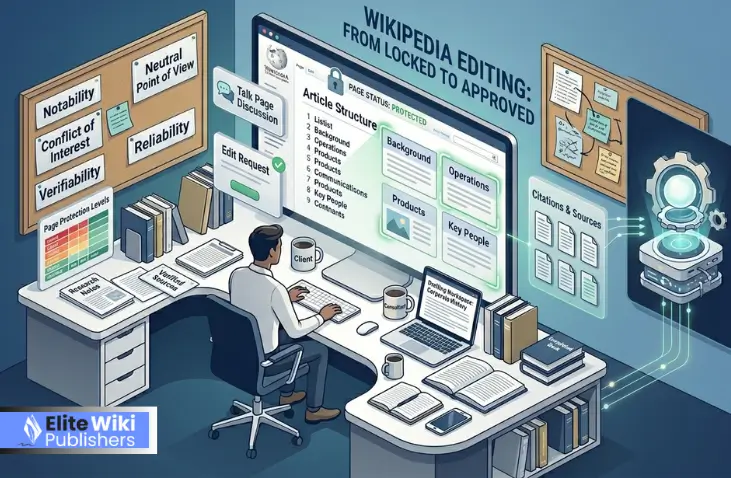
If you’ve ever tried to fix a simple typo on a famous politician’s profile only to find the “Edit” button missing, you’ve encountered a protected page. Wikipedia uses these digital locks as a vital shield against “digital graffiti” and the chaos of “edit wars.” These restrictions are essential for maintaining the integrity of the world’s most popular reference site.
There are several distinct security levels, including semi-protected and fully-protected statuses. If you want to know how to edit locked Wikipedia pages, you must first realize you are navigating a community-led defense system rather than just a software setting. At Elite Wiki Publishers, we understand that these barriers are safeguards for accuracy.
This setup ensures that high-stakes information stays neutral and reliable. By understanding these tiers and the protocols for requesting changes, you can successfully contribute to the platform’s rigorous editorial standards. This is the first step in moving from a frustrated reader to a sophisticated contributor.
Why Are Wikipedia Pages Locked?
The simple truth is that Wikipedia is a massive target. Without locks, pages for major brands or sensitive historical events would change every five seconds based on whoever has the loudest opinion. Wikipedia’s protection system is a proactive way to stop vandalism before it happens.
When a page is frequently targeted by trolls or becomes the center of a heated debate, administrators step in to “freeze” the content. This forces everyone to stop hitting the “undo” button and start talking. If you’re wondering how do I edit locked Wikipedia articles, you have to look at the “Talk” tab. That’s where the real work happens when the main page is under a security lockdown.
Common reasons for a lock include:
- Persistent Vandalism: Groups of people trying to add jokes or false info.
- Edit Warring: Two editors can’t agree and keep reverting to each other.
- High Visibility: Pages like “Earth” or “United States” are locked just because so many people view them daily.
Helping users understand the context of protection is vital so they don’t feel personally blocked. While you learn how to edit a Wikipedia page, remember that these protections maintain the site’s status as a top-tier reference.
How To Edit Locked Wikipedia Pages Online: Types & Their Editing Restrictions
Not all locks are created equal. Checking how to edit locked Wikipedia pages starts with the padlock icon in the top-right corner to see if you even have the clearance to contribute.
The Protection Spectrum
- Semi-Protected (Silver Lock): This is the most common. It prevents brand-new accounts and “anonymous” IP users from editing.
- Fully Protected (Gold Lock): Only administrators can touch these. These are usually for very high-risk articles or during extreme disputes.
- Template Protected (Pink Lock): Reserved for technical parts of the site that, if broken, would mess up thousands of other pages.
Knowing how to edit locked Wikipedia pages online starts with your account status. If you are an “autoconfirmed” user—meaning your account is at least 4 days old and has 10 successful edits—you can usually bypass silver locks yourself. For many, a Wiki page maintenance service is the easiest way to handle these technicalities, as they have the established accounts needed to interact with protected content without the “newbie” red flags.
Experienced editors understand that who qualifies for a Wikipedia page edit depends entirely on their track record. If you’re a beginner looking for how to contribute to Wikipedia, if the article is locked, your best bet is to build up your edit count on smaller, unprotected pages first.
How Do I Edit Locked Wikipedia Pages? A Step-by-Step Guide For Beginners
If you have a legitimate correction for a locked page, you don’t need to be an admin to get it done. You just have to follow the “Request an Edit” protocol. This is the most professional way to learn how to edit a locked Wikipedia article without getting your account banned for “disruptive behavior.”
Step 1: Check the Status
First, start by hovering over the padlock icon. If it says “semi-protected” and your account is at least a week old, you might be able to hit “edit” and proceed normally; however, if it says “fully protected,” you’ll need a different plan for how to edit a locked Wikipedia article. During this phase, many ask how much does it cost to edit Wikipedia—the answer is $0, but the time it takes to follow these rules is the real “cost.”
Step 2: Review the Guidelines
Since you might be asking, “Can I edit a locked Wikipedia article as an anonymous user,” it’s vital to ensure your proposed edits are “Wikipedia-ready” and backed by links to news sites or books before posting on the Talk page. If you are still learning how to structure an article on Wikipedia, spend some time reading the Manual of Style first.
Step 3: The Talk Page Request (The “Pro” Move)
Go to the Talk page of the article and click New Section to use the request edit template. If you are wondering, can I request a page be unlocked on Wikipedia, this is the best place to start by being very specific with your suggestions. Don’t simply say Fix the second paragraph; instead, say Please change [Current Text] to [New Text] because [Source].
If you find this process confusing, a Wikipedia page creation service can often handle the drafting for you to ensure it meets the community’s strict tone requirements.
Step 4: The Appeal
If your request is ignored or rejected, don’t get angry. Ask the editor why. Usually, it’s because your source isn’t strong enough. Knowing what happens if you falsely edit Wikipedia (like getting your IP blocked) should be enough to keep you on your best behavior during the appeal process.
Can I Edit A Locked Wikipedia Article As An Anonymous User Or Without Admin Rights?
Yes, you can, but think of yourself as a “consultant” rather than a “writer.” You provide the facts while others edit. It is common to ask if can you pay someone to create a Wikipedia page. This is exactly who can edit a locked Wikipedia page in a practical sense: the person with the best sources, regardless of their “rank.”
The Power of Suggestions
Non-admins contribute by being the “eyes and ears” on the Talk page. You can suggest better citations or point out outdated stats. Some people ask if they can you use chatGPT to write Wikipedia articles to speed this up. The short answer? Only for drafting. Wikipedia’s community hates “AI-speak,” so if you use it, make sure you rewrite it to sound human and verify every single “fact” the AI gives you.
Helping the site grow doesn’t always require an “Edit” button. Sometimes, simply finding a better link or a more neutral phrasing is the best way to get a Wikipedia page approved or updated. Your goal is to make the admin’s job so easy that they just have to copy and paste your work.
Common Problems & Solutions When Editing Locked Pages
The biggest hurdle isn’t the lock; it’s the other editors. When a page is protected, knowing how to edit locked Wikipedia pages is vital because if you try to change something and they revert it, you’ve entered a serious “edit conflict.”
To win an edit conflict, you need data, not drama. If you are struggling with how to edit a Wikipedia article that is semi-protected, the solution is usually better sourcing. If an editor says your source is “biased,” find three more that say the same thing. For businesses, this can be a nightmare to manage, which is why many hire Wikipedia editing services to navigate the social politics of the site.
If you are accused of “vandalism” just for making a mistake, don’t panic. Clarify your intentions on the Talk page. Many users pay someone to create a Wikipedia page specifically to avoid these awkward social blunders that can ruin a reputation before it even starts.
How To Request To Edit A Locked Wikipedia Page?
This is the “formal” way to get things done. Every article has a hidden “backroom” where editors discuss the content. That is the Talk Page. If you want to know how to request to edit a locked Wikipedia page, you need to learn the language of these forums.
First, always be polite. Wikipedia admins are volunteers; they don’t have to help you. Second, use the “Submit an Edit Request” button if it’s available. If you are working across different languages, you might need a Wikipedia page translation service to make sure your request makes sense to the local community of that specific Wikipedia version.
The key to a successful request is being “Ready to Publish.” Provide the exact sentence you want changed and the exact sentence you want to replace it with. If you are unsure about the best phrasing, looking up how to edit locked Wikipedia pages tutorials can give you templates that admins are used to seeing.
How To Edit A Locked Wikipedia Article When Your Changes Get Rejected
Rejection happens to the best of us. Usually, it’s because your edit felt like an “advertisement” or your source was a personal blog. If you are wondering how do I get permission to edit a locked Wikipedia page, the answer is: you don’t “get permission,” you earn it by being right.
If you’re writing about a person, Wikipedia biography writing requires very specific “Notability” standards. If your edit was rejected because the person “isn’t famous enough,” you need to find more “independent” news coverage (not interviews).
If the dispute gets bad, seek a “Third Opinion” to break a tie. Professional top consultancy services Wikipedia experts recommend this to resolve rejections neutrally. Always stay professional and remember that learning how do I edit locked Wikipedia is a marathon requiring persistence and high-quality sources.
Who Can Edit A Locked Wikipedia Page & How Administrators Approve Edits
Admins are the “janitors” of the site. They have special buttons that allow them to lock and unlock pages. When you ask who can edit a locked Wikipedia page, the admin is the one who actually clicks “Save” on the restricted content.
They aren’t “bosses,” but they do enforce the rules. If you think a page should be unlocked, you have to prove to an admin that the “war” is over. Using Wikipedia notability services can help you gather the proof needed to show an admin that a subject is important enough to warrant an updated, unlocked page.
Always remember that admins are looking for “Consensus.” If five people agree, they will update the page. Since not everyone knows how to edit locked Wikipedia pages, they aren’t there to judge your opinion; they are there to make sure the community agrees with facts.
How Do I Get Permission To Edit A Locked Wikipedia Page Or Request An Unlock?
Sometimes a page has been locked for years, and everyone has forgotten why. In these cases, you can actually ask to have the lock removed. You might ask: can I request a page be unlocked on Wikipedia? Yes, you can, but you need a good reason.
You would do this at the “Requests for Page Protection” (RFPP) noticeboard. You’ll need to explain that the vandalism has stopped or that you want to do a major overhaul of the page that would be too difficult to do via Talk page requests. A Wikipedia page maintenance service often does this for clients to keep their pages fresh and accessible for future updates.
While you wait for an unlock, you should still be learning how to contribute to Wikipedia if the article is locked. You can draft the new version of the page in your “Sandbox” (a private drafting area) and show it to the community as proof that you have good intentions.
How To Edit A Wikipedia Article That Is Semi-Protected VS Fully Protected
At the end of the day, the locks are why we trust Wikipedia. If anyone could change the page for “Medicine” at any time, the site would be dangerous. The protection system forces a “peer-review” process that keeps the info high-quality.
The fact that you are researching how to edit locked Wikipedia pages shows you care about accuracy. This gatekeeping ensures that how often is Wikipedia updated is a question of quality, not just quantity. It prevents “disinformation” from staying on the site for more than a few minutes.
Ultimately, these restrictions help the encyclopedia stay neutral. If you are just starting, learning the do’s of editing a Wikipedia page that is open will give you the skills you need to eventually tackle the big, locked ones.
Final Tips On How Do I Edit Locked Wikipedia Pages
Understanding the nuances of the platform’s security is the only way to successfully learn how to edit locked Wikipedia pages without getting discouraged. These protections are not meant to be permanent walls, but rather safeguards that ensure the encyclopedia remains a reliable source of truth in an era of misinformation. By utilizing the Talk page, providing high-quality citations, and respecting the consensus of the community, you can successfully navigate even the most restrictive editing environments.
Whether you are correcting a historical error or updating a news story, knowing how to edit locked Wikipedia pages online ensures your contributions remain the lifeblood of the site. Stay patient, follow the protocols, and remember that every expert editor started exactly where you are today.